Introducing leapsea: From research questions to results you can review

leapsea is an AI4S open agent platform for scientific research, product development, and engineering. Bring project files, specialist skills, and tools into the same task, and produce work your team can check and build on.
Research rarely starts with an empty chat. There are already papers, datasets, and notes from the last meeting in the project folder. The hard part is bringing those materials to bear on one question, deciding what the evidence supports, and leaving a record a colleague can follow. We built leapsea to give agents a practical role in that work.
Start with a question and ask for a result you can check
Suppose you have three sets of experimental records and want to understand why measurements differ between batches. In leapsea, choose the working folder and ask the agent to organize the batches, units, and measurement conditions, flag missing fields, and propose a plan for checking each difference. In planning mode, you can review the plan before deciding whether to run it.
Specify the deliverable as well: a comparison table that records the source file, row, and rationale for each anomaly, with unexplained differences listed separately. You can then check the results against the original records and share the table and analysis notes with a colleague.
Try a reviewable task with NIST's mass calibration case
NIST's records from balance 12 show how slowly a change in a calibration process can become visible. The handbook used 117 calibrations from 1975 to 1985 to establish the baseline for its control chart. Only two readings crossed the limits, and those calibrations were discarded and repeated. The later readings also changed how they clustered around the center line, which gave reviewers a separate reason to investigate.
NIST publishes the data file and plotting code. Put them in a leapsea project and ask the agent to identify the baseline window, explain the vertical axis, and flag points for review before writing a script you can rerun. Check two things against the original example: the number of records in the baseline and whether any later observations have accidentally been included in it.
Check every interpretation against the original figure or method notes. Save the input versions, decision rules, and open questions with the project. This is a suggested leapsea workflow using an independently published NIST example.
Read the check quantity before rerunning the chart
NIST explains what its check statistic represents. It monitors the difference between estimates for two one-kilogram reference standards obtained in the same calibration. The public data file records the date, check standard identifier, check value and balance identifier. Ask the agent to match the data header to the axis definition and the plotting code. Check those links against the original passages and confirm that the plotted points come from the agreed set of runs.
In a leapsea project, you could start with the handbook, the dataset and NIST's example code. Ask for a data note, a rerunnable script and a chart with the baseline identified. If you also want to try a different baseline, save the two runs separately. When the center line or limits differ, the report should tell you which observations and calculation defined each.
NIST's account also draws attention to the distribution of readings. A few points outside the limits and a persistent skew around the center line are different clues worth examining. Ask the agent to record what it sees and set out possible explanations separately. Whether a reference standard changed or instrument precision shifted would need further records from the calibration process.
Hand this review method to the next team
Suppose a team has checked a similar instrument and wants to pass its method to another lab. It could prepare shared skill instructions and retain a separate local project record. The instructions describe input fields, baseline selection, expected results and human review points. The local record keeps that team's datasets, decisions and evidence. A public or synthetic example can demonstrate the method while the next lab runs it on material it is authorized to use.
The marketplace gives another user a way to discover a method for the work in front of them. On the first run, try a small set of known readings and compare the result with the lab's existing process. If columns, units or review procedures differ, record those differences. A creator can use a shareable failing example to document a new input constraint or adapt the method for another setting.
Leave a route from the delivered result to the inputs. For the control chart, the caption can state the baseline, the analysis record can identify the scripts and data, and the review notes can name what remains open. Another team can reuse the steps and inspect them. It still needs evidence from its own measurements to draw conclusions about its process.
Bring specialist methods into the task
The resource marketplace brings together Domain Experts, skills, and connectors. Domain Experts offer workflows tailored to particular fields. Skills capture repeatable methods, while connectors bring external sources and tools into the workflow. For a literature comparison, for example, a search connector can help find papers, and a review skill can help organize the research questions, comparison conditions, and sources.
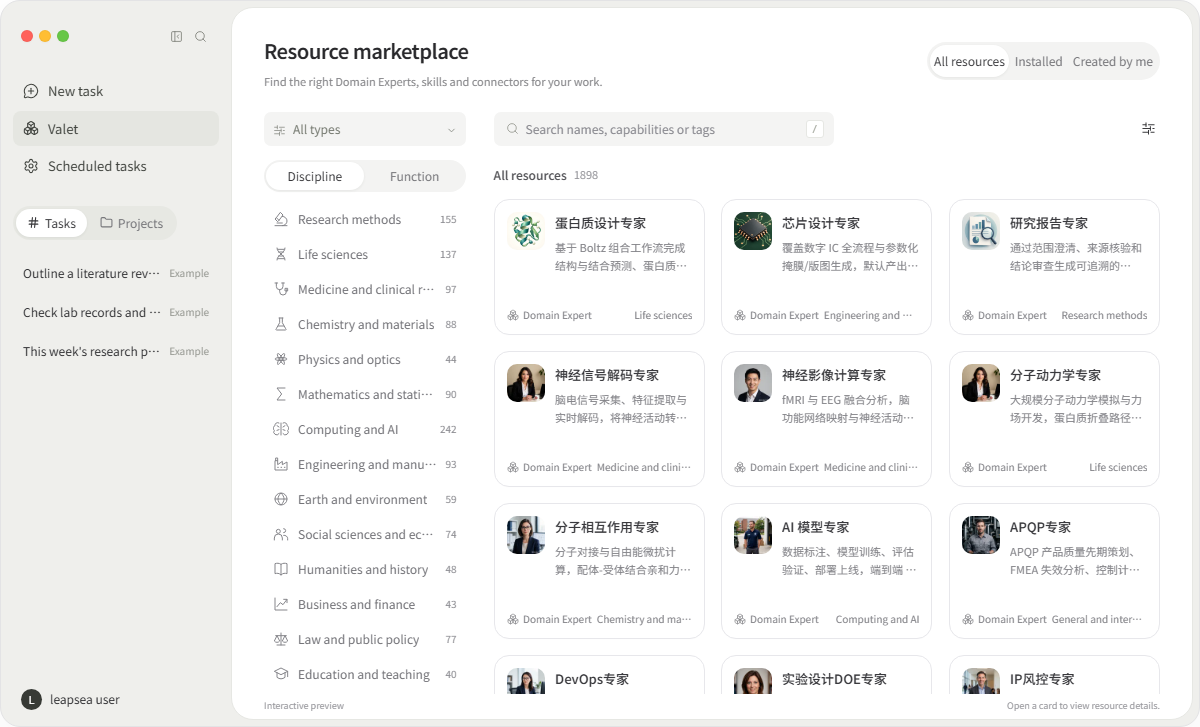
Before choosing a skill, check what material it accepts and what it produces, then try it on a small sample. This helps you see which conditions are missing and which results still need human review.
How specialist methods reach the teams that need them
The marketplace connects researchers and engineers who have developed specialist methods with teams looking to solve a specific problem. Creators can package a validated method as a skill, document its intended use, inputs, steps, outputs, and review points, then submit it for review. Once it is published, teams anywhere can find it by discipline, function, or keyword, assess whether it fits, and invoke it through an agent in their own task.
For example, one team might publish a skill for checking experimental data, along with field definitions, a checking script, and a sample free of sensitive information. A team in another region can apply the method to its own records to check units, missing values, and differences between batches, adapting the rules to its local requirements. The method travels while each team works with data it is authorized to access. The creator does not need to share the original experimental records.
Expertise can flow back as well. If users encounter a new data format or an edge case the method does not handle, they can share a reproducible example and findings they are allowed to disclose, or package their own validated approach as a new skill. Creators gain evidence for improving their methods, and the next team starts with a more complete workflow. A user in one task can become a creator for the next.
Keep the project together and set clear permissions
A research question may take weeks to resolve. Give it a project so that related tasks, working folders, and outputs stay together. If you need regular literature tracking or progress summaries, you can set a scheduled task. Scheduled tasks currently run in read-only mode and require the desktop app to stay open.
File access and task permissions define what the agent can do. On supported platforms, tasks can run in a local sandbox. When a task uses an online model, relevant context may be sent to the selected model service under its rules. Check your data requirements before working with sensitive material, and grant the access the task needs.
Try it on a task you already have
Choose the macOS or Windows installer for your device on the download page. After installing and signing in, pick a task with a clear deliverable you can check against the source material, such as organizing existing notes, reviewing a data table, or drafting a prototype acceptance checklist.
Give the agent a clear set of materials, explain what you want back, and say how you will verify it. Start with one small task, then carry the method you have checked into the next one.